# a) ajout au cluster de deux serveur proxmox

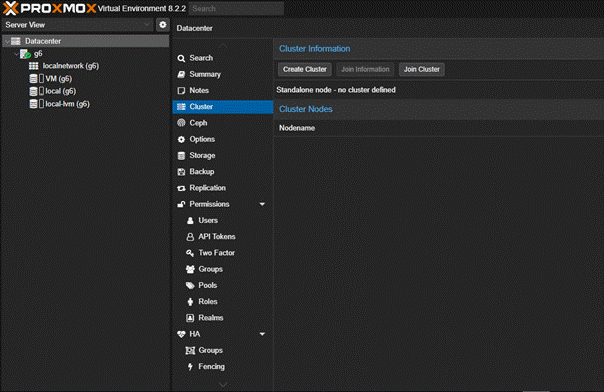
##### <span style="color: rgb(35, 111, 161);">Dans un premier temps, nous allons aller dans "</span>****Datacenter****<span style="color: rgb(35, 111, 161);">" ou "</span>****Centre de données****<span style="color: rgb(35, 111, 161); white-space: pre-wrap;">" puis </span>****"****Cluster****<span style="color: rgb(35, 111, 161);">" / "</span>****grape de serveurs****<span style="color: rgb(35, 111, 161); white-space: pre-wrap;"> ".</span>

##### <span style="color: rgb(35, 111, 161);">On va donc arrivé ici:</span>

##### ![Une image contenant texte, capture d’écran, logiciel, Logiciel multimédia

Description générée automatiquement](https://docu.lerenard.eu/uploads/images/gallery/2025-04/z7Hhiy7JKDJRWzut-embedded-image-mhjlnubm.png)

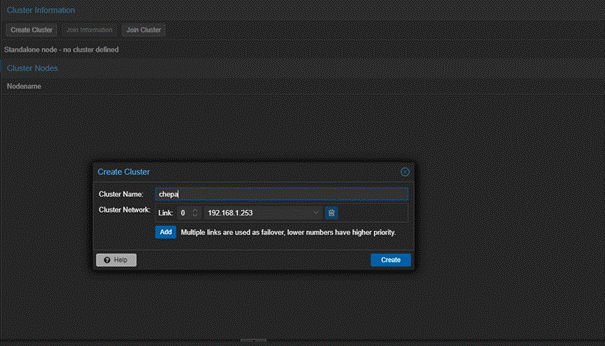
##### <span style="color: rgb(35, 111, 161);">Une fois ici, nous allons faire "</span>****Create cluster****<span style="color: rgb(35, 111, 161);">" / "</span>****Créer une grappe****<span style="color: rgb(35, 111, 161);">" de serveurs puis donner un nom comme vous le souhaitez :</span>

##### ![Une image contenant capture d’écran, Logiciel multimédia, logiciel, Logiciel de graphisme

Description générée automatiquement](https://docu.lerenard.eu/uploads/images/gallery/2025-04/2s9HVNQ5fh2orIos-embedded-image-ru3h7sve.png)

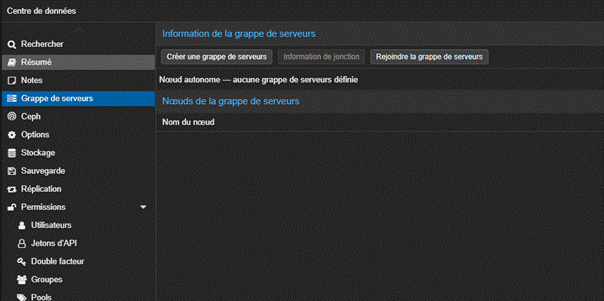
##### <span style="color: rgb(35, 111, 161);">Puis nous allons dans l’autre serveur qui n’a aussi pas de machine virtuelle. Cette fois si on fait "</span>****rejoindre la grappe de serveurs****<span style="color: rgb(35, 111, 161);">" / "</span>****join cluster****<span style="color: rgb(35, 111, 161);">" :</span>

##### ![Une image contenant texte, capture d’écran, logiciel, Logiciel multimédia

Description générée automatiquement](https://docu.lerenard.eu/uploads/images/gallery/2025-04/I3Vbfe6cUJOAgbBw-embedded-image-axdwcg8b.png)

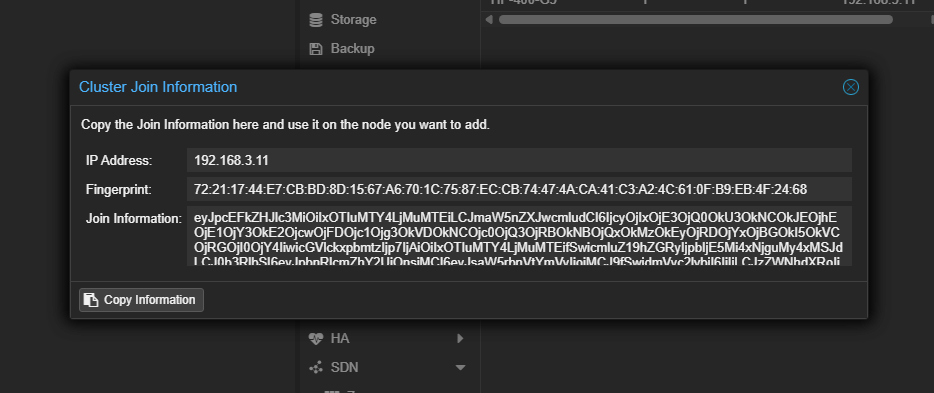
##### <span style="color: rgb(35, 111, 161);">Sur le serveur principal, on ira chercher "</span>****information de jonction****<span style="color: rgb(35, 111, 161);">" / "</span>****join information****<span style="color: rgb(35, 111, 161);">" comme si dessous :</span>

##### [![image.png](https://docu.lerenard.eu/uploads/images/gallery/2025-04/scaled-1680-/GGKRB4cX28oLodH3-image.png)](https://docu.lerenard.eu/uploads/images/gallery/2025-04/GGKRB4cX28oLodH3-image.png)

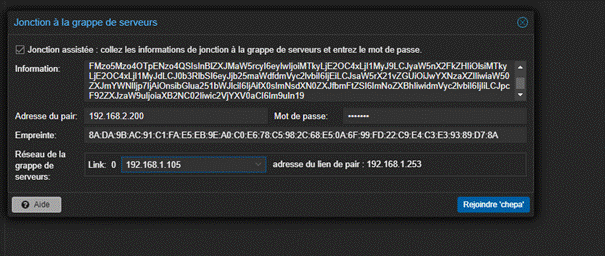
##### <span style="color: rgb(35, 111, 161);">Puis on colle ça dans "</span>****information****<span style="color: rgb(35, 111, 161);">" puis on spécifie le mot de passe du proxmox qui héberge le cluster puis on selectionne l'adresse ip :</span>

##### ![Une image contenant texte, capture d’écran, logiciel, Logiciel multimédia

Description générée automatiquement](https://docu.lerenard.eu/uploads/images/gallery/2025-04/FOJ9pHemrMlKVLAu-embedded-image-str0juga.png)

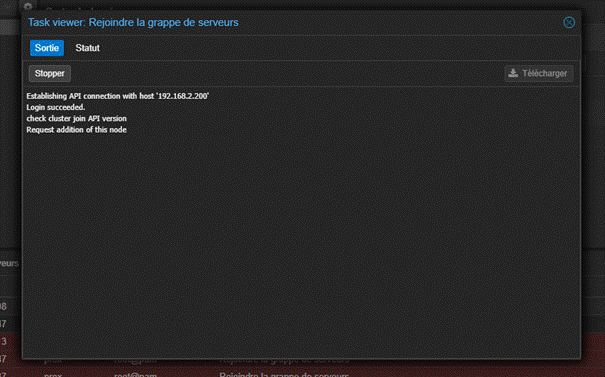
##### <span style="color: rgb(35, 111, 161);">puis on va voir qu'il rajoute au cluster le second serveur:</span>

##### ![Une image contenant capture d’écran, texte, logiciel, Logiciel multimédia

Description générée automatiquement](https://docu.lerenard.eu/uploads/images/gallery/2025-04/8QG6InFFbzm45un7-embedded-image-nqbgjdyn.png)

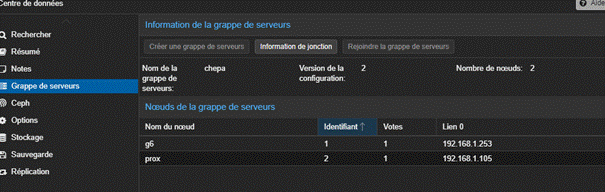
##### <span style="color: rgb(35, 111, 161);">Et puis on vois qu'il est correctement ajouté :</span>

##### ![Une image contenant texte, capture d’écran, logiciel, Logiciel multimédia

Description générée automatiquement](https://docu.lerenard.eu/uploads/images/gallery/2025-04/cW39JzXmMJr4pg1C-embedded-image-rsb1iey0.png)